Robotic Pool Cleaner Maintenance Tips: Keeping Your Robot in Top Shape for 2026
Most Kiwi pool owners are accidentally shortening their robot's lifespan by up to 35% simply by ignoring a few basic care steps. It's incredibly frustrating when your premium cleaner gets stuck on a drain or the battery fails to last a full cycle. You invested in a robot to save time, so you shouldn't have to spend your weekends wrestling with clogged filter canisters or deciphering complex manuals. We agree that pool maintenance should be effortless, not a source of technical stress.
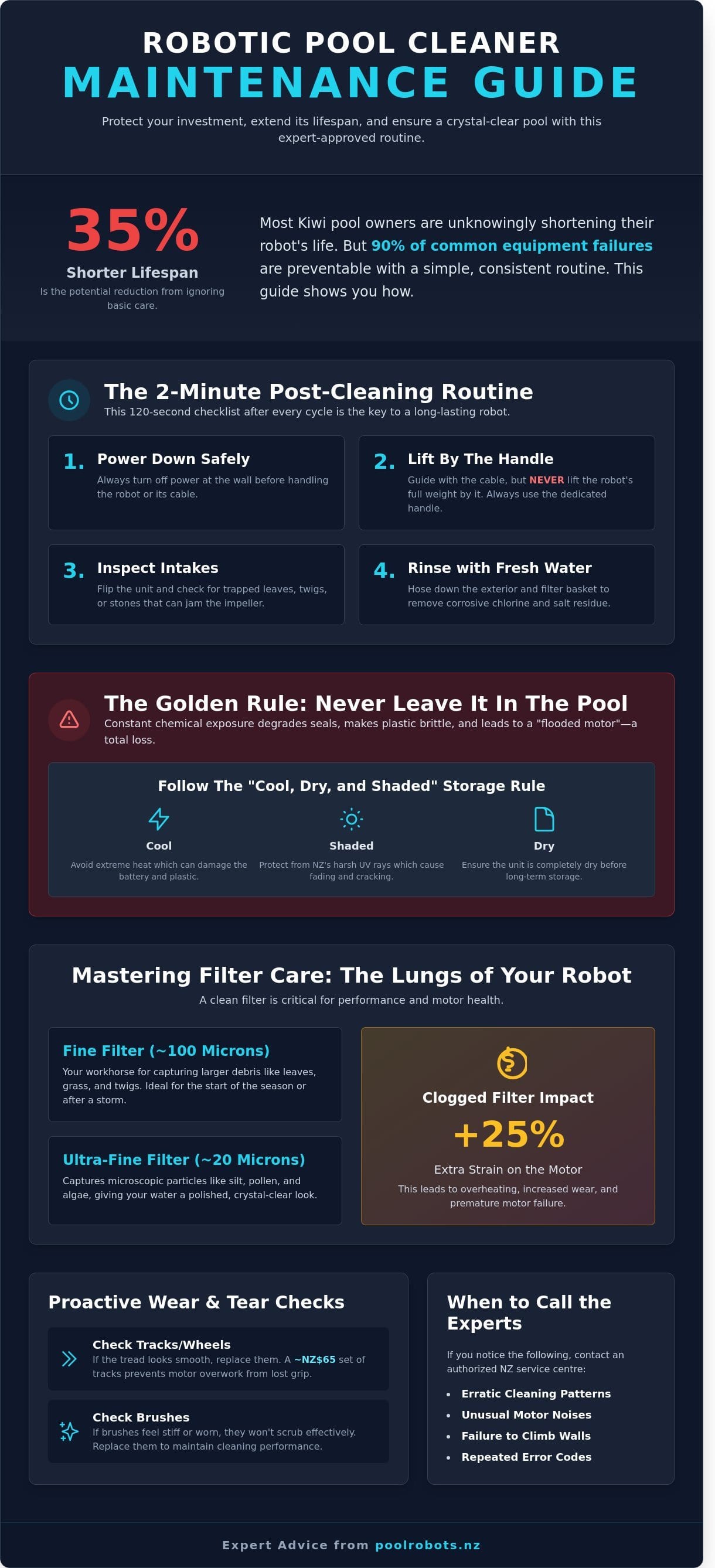
As New Zealand's robotic pool cleaner specialists, we've put together the ultimate guide to robotic pool cleaner maintenance tips. Our goal is to help you protect your investment and ensure your water stays crystal clear without the headache. We'll show you the exact expert-approved routine that adds years to your iGarden or similar model, keeping it out of the repair shop and in the water where it belongs. This guide provides a simple weekly checklist and professional storage secrets to make your summer cleaning completely hassle-free for 2026.
Key Takeaways
- Discover why a simple 2-minute "rinse and repeat" routine after every swim can prevent 90% of common equipment failures and keep your water crystal clear.
- Learn how to identify the difference between filter types and effectively remove the invisible biofilm that often clogs mesh canisters.
- Master the golden rules of Lithium-Ion battery care and essential robotic pool cleaner maintenance tips to maximise the lifespan of your cordless cleaner.
- Protect your investment from New Zealand’s harsh UV rays by following the "Cool, Dry, and Shaded" rule for proper off-season storage.
- Find out how to recognise when a motor issue or erratic cleaning pattern requires professional support from an authorized NZ service centre.
Table of Contents
- The 2-Minute Post-Swim Routine: Why Maintenance Matters
- Mastering Filter Care: The Engine of Your Robotic Cleaner
- Cordless Specifics: Maximising Battery Life and Charging
- Off-Duty Care: Proper Storage and Water Chemistry
- When to Call the Experts: Professional Support for Your Robot
The 2-Minute Post-Swim Routine: Why Maintenance Matters
You've just invested between NZ$1,500 and NZ$3,500 in a high-quality machine to reclaim your weekends. It's tempting to let the technology do every bit of the heavy lifting while you stay on the deck. However, spending exactly 120 seconds on a basic routine after each cleaning cycle is the primary factor that determines if your unit lasts three years or ten. At Pool Robots NZ, we've found that 90% of common motor and drive-system failures don't stem from manufacturing defects. Instead, they're caused by preventable debris blockages or chemical corrosion that a quick check-up would have caught before the damage became permanent.
Fresh water is the most effective tool in your arsenal. Whether you run a salt chlorinator or a traditional liquid chlorine system, your pool water is chemically aggressive by design. These chemicals are great for killing bacteria, but they're tough on rubber seals and plastic housings. A 30-second rinse with a standard garden hose removes these corrosive residues before they can dry and crystallize. This simple habit prevents the NZ$450 to NZ$600 repair bills typically associated with replacing a compromised motor block or a bleached cable jacket.
Early detection of wear and tear is what separates a savvy pool owner from one who pays for avoidable repairs. Small issues like a frayed drive belt or a slightly torn filter canister can be fixed for under NZ$80 if caught early. If you ignore these signs, the robot's internal computer often overcompensates by drawing more power to the motor. This extra strain leads to "burnout," which is a far more complex and expensive problem to solve. Being proactive ensures your pool stays crystal clear without the stress of sudden equipment failure.
New Zealand's Consumer Guarantees Act offers excellent protection for shoppers, but it doesn't cover "lack of reasonable care." Most manufacturers require owners to follow specific robotic pool cleaner maintenance tips to keep the factory warranty valid. If a service technician finds evidence of prolonged chemical exposure or internal damage from a jammed impeller, they may categorize the fault as owner neglect. Following a consistent routine keeps your investment protected and your warranty standing rock-solid.
The Immediate Post-Cleaning Checklist
- Always power down the control box at the wall before you touch the water or the cable.
- Gently guide the robot to the surface using the cable, but only lift the unit out of the water using the dedicated handle to avoid straining the internal wiring.
- Flip the unit over and inspect the intake valves for trapped twigs, gum leaves, or small stones that can jam the brushes.
- Give the entire exterior and the filter basket a quick-rinse with fresh water to strip away salt and chlorine residue.
Why 'Set and Forget' Doesn't Mean 'Leave in the Pool'
Leaving your robot submerged for days on end is a recipe for disaster. Constant exposure to water, even when the chemistry is balanced, will eventually degrade the watertight seals that protect the sensitive electronics. If your pool's pH levels fluctuate outside the ideal 7.2 to 7.6 range, the plastic components can become brittle and prone to cracking. Waterlogged foam components lose their specific gravity and prevent the robot from climbing walls effectively. Once the internal seals are breached, the resulting "flooded motor" is usually a total loss. Taking the robot out of the water after its cycle ensures the seals stay dry and the plastic remains flexible for years of effortless cleaning.
Regularly checking your brushes and tracks is the final piece of the puzzle. If the tread on the tracks looks smooth or the brushes feel stiff, the robot will lose its grip on your pool tiles. Replacing a NZ$65 set of tracks early prevents the motor from overworking. We make maintaining your pool robot easy by focusing on these small, high-impact habits that save you time and money in the long run.
Mastering Filter Care: The Engine of Your Robotic Cleaner
Think of your filter canister as the lungs of your machine. If it can't breathe, it can't work. When you ignore basic robotic pool cleaner maintenance tips, the filter is usually the first part to suffer. Most modern robots include two distinct grades of filtration: fine and ultra-fine. Fine filters, typically rated around 100 microns, are your go-to for the start of the season. They're designed to trap large organic matter like leaves and twigs without clogging instantly. Ultra-fine canisters use a much tighter mesh, often down to 20 microns, to capture the microscopic silt and skin cells that make your water look dull.
A dirty filter does more than just leave debris behind. It creates massive physical resistance. When the mesh is blocked, the internal pump motor has to work 25% harder to pull water through the system. This extra strain generates excess heat, which can degrade internal seals over time. For cordless models, a clogged canister is a primary cause of short runtimes. A robot that usually cleans for 2 hours might only last 90 minutes because the battery is fighting against a restricted water flow. Keeping these filters clear is the simplest way to protect your motor and extend your battery life.
Deep Cleaning Your Filter Canisters
Cleaning starts with a standard garden hose. Never use a high-pressure washer. The 3,000 PSI from a pressure washer will blast holes right through a 20-micron mesh. Instead, use a steady stream of water from the inside out to push debris away from the fabric. If you notice a slippery, translucent film, that's biofilm. It's an invisible layer of bacteria that soap alone won't move. Use a soft-bristled brush and a mild pH-neutral cleaner to gently scrub the panels. Finish with the sunlight test. Hold the dry filter up to the sun. If you see dark patches where light doesn't penetrate, the mesh is still choked with oils or fine dust.
Managing Different Debris Types in NZ Pools
Kiwi pools face unique environmental challenges that require a strategic approach to filtration. In regions like Auckland or Rotorua, fine volcanic dust can settle on the pool floor overnight. This dust is so small it passes right through standard filters, so you must use your ultra-fine canisters during these periods. If your backyard is home to iconic Pohutukawa or Eucalyptus trees, your robot will face a heavy load of waxy leaves and seed pods. These large items fill canisters quickly. During the spring pollen "yellow haze" seen across many NZ regions, expect to clean your filters every 60 minutes. This prevents the fine yellow dust from compacting into a solid, waterproof brick inside the mesh. If your current filters are showing signs of wear and tear after a heavy season, you can talk to a pool robot expert to find the exact replacement parts for your model.
You'll eventually reach a point where deep cleaning isn't enough. Most filter canisters have a functional lifespan of 24 to 36 months depending on your pool's chemical balance. If you notice the mesh is fraying, or if the plastic frames are warped, it's time to replace them. Replacing a NZ$90 filter set is much cheaper than replacing a NZ$600 motor block damaged by constant over-exertion. Check your filters weekly for any small tears. Even a 5mm hole allows thousands of litres of unfiltered water to bypass the system, meaning your robot is just moving dirt around rather than removing it.
Cordless Specifics: Maximising Battery Life and Charging
Cordless robots offer a hassle-free experience for Kiwi pool owners, but their reliance on Lithium-Ion (Li-ion) technology means you need to follow a specific playbook. These batteries are high-performance components designed to last between 300 and 500 full charge cycles. One of the most vital robotic pool cleaner maintenance tips is understanding that these batteries don't like extremes. They perform best when kept between 20% and 80% charge. If you leave your robot at 0% for more than 48 hours, you risk permanent cell damage that reduces the total capacity of the unit.
Deep discharge cycles are the primary cause of premature battery failure. When your iGarden robot signals a low battery, usually via a flashing LED or a smartphone notification, it's telling you that the voltage has dropped to a critical level. Avoid the temptation to restart the robot for "just five more minutes" of cleaning. Consistent deep discharging can shorten the battery's 4-year life expectancy by as much as 50%. If you notice your robot is struggling to climb walls or is stopping mid-cycle after only 45 minutes of use, these are clear signs that the battery health is dipping.
To keep your investment running for the long haul, follow these golden rules of battery care:
- Partial over total: It's better to charge the robot after every short use than to wait until it's completely dead.
- Storage levels: If you're packing the robot away for the New Zealand winter, charge it to exactly 50% first.
- Avoid heat: Never store the robot in a hot tin garden shed where temperatures can exceed 35°C.
The Correct Charging Procedure
Water is the primary enemy of your charging port. Always use a soft, dry microfiber cloth to wipe the contact points before you connect the power lead. Even a single drop of chlorinated water can cause electrolysis, which creates green corrosion on the metal pins and prevents a clean connection. You should always charge your robot in a cool, shaded area like a garage or a covered porch. Charging in direct sunlight causes thermal stress, which degrades the internal chemistry of the cells. Don't leave your robot on the charger for 14 days or longer. Once the indicator light shows a full charge, unplug the unit to prevent unnecessary trickle-charging.
Maximising Run-Time per Cycle
New Zealand winters can be tough on battery efficiency. When pool water temperatures drop below 15°C, the chemical reactions inside the battery slow down. This can result in a 15% to 20% reduction in total run-time compared to a 25°C summer day. To get the most out of every charge, you must reduce mechanical friction. Check the tracks and rollers for tangled hair, grit, or small sticks every 3 uses. If the drivetrain is clogged, the motor has to work harder and draws more current, draining the battery faster. These robotic pool cleaner maintenance tips ensure your cleaner stays efficient throughout the year. It's a common myth that you need to fully drain the battery to prevent a "memory effect" but modern lithium batteries don't suffer from this issue and actually prefer frequent, smaller top-ups.